On-screen valuation for universities & colleges in India On-screen marking for Indian-curriculum schools in the UAE
Value this answer. Mark this answer.
Three answers from a B.Tech Data Structures paper, scanned exactly as the student wrote them. Award marks for each question. That is everything an evaluator needs to learn. Three questions from a Class 10 Science paper, scanned exactly as the student wrote them. Tap a mark for each one. That is everything your teachers need to learn.
Already valuing at university scale. Proven at university scale. Now built for schools.
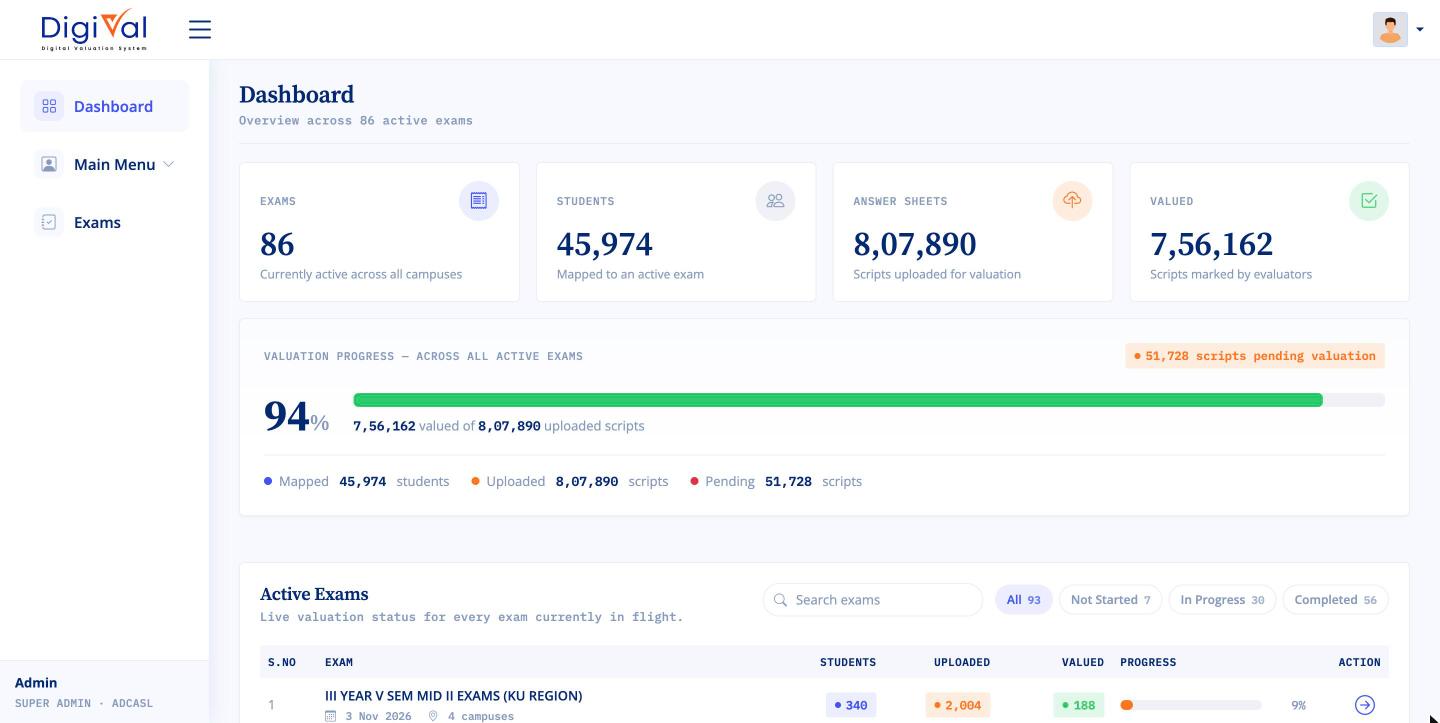
Live figures from the DigiVal console across college campuses in India, November 2026.
of uploaded scripts already valued across all active exams.
Why move off paper
Valuation is the slowest, riskiest week of every semester. Marking shouldn’t cost your teachers their weekends.
DigiVal keeps your examination rules exactly as they are. It replaces the bundles, camps and calculators around them. DigiVal keeps your marking schemes exactly as they are. It replaces the bundles, red-pen totals and paperwork around them.
Bundles travel between campuses
Scripts never leave the strongroom
Booklets are scanned once. Only secure images move to evaluators.
Evaluation camps, DA and TA bills
External evaluators value remotely
From their own college or home, anywhere in India. No travel, no camp, no DA or TA.
Totalling errors found at revaluation
Totals the system calculates
Marks entered question by question against your schema, then verified in scrutiny.
No visibility until results are late
Live progress for the CoE
Every exam, subject and evaluator, across all campuses, on one dashboard.
Bundles carried home every weekend
Mark at school or at home
On the laptop, tablet or phone your teachers already use.
Hours spent adding totals
Totals add themselves
Teachers give marks per question. DigiVal does the arithmetic.
Inconsistent marking across sections
Blind second marking
A second teacher can re-mark any script without seeing the first marks.
Parents disputing marks
Share the marked script itself
Every mark is visible, question by question, with the teacher’s notes.
How it works
From answer booklet to result in five steps. From answer sheet to report card in four steps.
- 1Exam cell
Scan & barcode
Booklets are cut and scanned on ADF scanners. Each one is matched to its student by barcode, so the register number never reaches the evaluator.
- 2Controller of Examinations
Allot
Scripts are allotted to evaluators by subject, in a few clicks or in bulk from an Excel sheet.
- 3Evaluator
Value on screen
Marks per question against your exam schema, with ticks and comments on the script. Totals add themselves.
- 4Scrutiniser
Scrutinise
A second evaluator checks every script for unvalued answers and totalling errors before it counts.
- 5Controller of Examinations
Publish results
Subject marks, section reports and student results, ready to export to your examination system.
- 1School office
Scan on the office copier
A class set goes through the copier you already own. Each sheet is matched to its student by a code, and the name is hidden before any teacher sees it.
- 2Teacher
Mark on any device
Teachers open their allotted scripts and mark question by question. Totals add themselves.
- 3Head of department
Moderate
A second teacher re-marks a sample blind. Differences are flagged before results go out.
- 4Principal
Results & sharing
Marks flow into a class sheet with question-wise analysis, and each marked script can be shared with the student and parent.
Remote external evaluation
Appoint external evaluators from anywhere. Stop paying DA and TA.
Autonomous colleges and universities can engage external evaluators from any institution. They value from their own college or home, so nobody travels to your campus, and there is no DA, TA or accommodation to pay.
- A wider pool of experts. Choose the best subject evaluators in the state or the country, not just those who can travel.
- Zero travel cost. No dearness allowance, travel allowance, hostel or camp arrangements.
- Still fully supervised. Every remote session records the evaluator’s photograph, IP address and valuation time. See how
For universities & collegesFor schools
What changes for you?
- Declare results sooner: no evaluation camps and no bundles moving between campuses.
- Appoint external evaluators from any institution, without paying DA or TA.
- Live progress for every exam, subject and evaluator, without a single phone call.
- Scrutiny built in, so totalling errors are caught before results, not at revaluation.
- A complete record of who valued which script, and when, for every audit query.
- Evidence of consistent, moderated marking, ready for your next inspection.
- Live progress for every exam, class and teacher, without asking anyone.
- Pre-boards marked the way CBSE now marks Class 12: on screen.
Sample view · Semester valuationPre-board progress
3 evaluators behind schedule on Engineering Physics. Reallot in one click.
- Value from your own college or from home. No travel to a valuation camp.
- Accept external valuation work from any university without leaving your city.
- Marks per question against the scheme, with totals calculated for you.
- Tick, cross and comment right on the scanned page.
- Learned in one short session. You have just done it above.
- No bundles to carry home and no totals to add.
- Mark from school or home, on the device you already use.
- Learned in one short session. You have just done it above.
Sample view · My allotmentMy scripts
Data Structures · B.Tech III Yr · Bundle 14Science, Periodic Test 2 · 10-B
24 scripts left. Pick up exactly where you stopped.Eight scripts left. Pick up where you stopped.
- Valued on merit: your name and register number are never shown to the evaluator.
- Every script is checked by a second evaluator before your result is published.
- Results sooner, and your valued script can be retrieved for revaluation in minutes.
- See the marked script itself, not only the number.
- Understand where marks were lost, question by question.
- Fewer disputes with the school, because every mark is visible.
Sample view · Student resultShared with student & parent
Data Structures · Semester-end examinationYour Science paper has been marked
58/707/10
Valued and scrutinised. Annotated script available for revaluation as per university rules.Open the scanned script to see each mark and the teacher’s notes.
Security & integrity
Remote valuation, with nothing left to trust. Marking from anywhere, with nothing left to trust.
Evaluators can value from anywhere, so DigiVal proves who valued each script, from where, and for how long. Every session is on record for the Controller of Examinations. Teachers can mark from anywhere, so DigiVal proves who marked each script, from where, and for how long. Every session is on record for the principal.
Every valuation session is verified.
- Evaluator photographMarker photographCaptured through the webcam during valuation, so the person valuing is the person you appointed. No proxies.
- IP addressLogged for every session, so you know where each script was valued from.
- Valuation timeStart time, end time and time spent on every script, so rushed or careless valuation stands out immediately.
- Photo
- Verified
- IP address
- 49.205.···.24
- Started
- 10:42:15
- Ended
- 11:06:51
- Script
- 7F3K-029110B-0417
- Time on script
- 24 min 36 s
Blind evaluation
Booklets are identified by barcode. Evaluators never see a name, register number or college code.Names and roll numbers are hidden from the marker on every script.
Allotted scripts only
The CoE office, evaluators and scrutinisers each see only the exams and scripts allotted to them.Principals, heads of department and teachers each see only the classes and scripts assigned to them.
Every mark on record
Question-wise marks and annotations are saved against the evaluatorteacher and the script, ready for any audit or revaluationparent query.
Two-level scrutinyBlind moderation
A second evaluator verifies every script. Errors are logged and sent back before results.A second teacher re-marks a sample without seeing the first marks. Differences are flagged.
Originals stay locked
Physical booklets stay in the strongroom after scanning. Nothing travels, nothing goes missing.Paper scripts stay at school after scanning. Nothing goes home in a bag.
Your data, your serversHosted in the UAE
Deploy on DigiVal’s managed servers or on your own campus infrastructure.Student data stays on servers in the UAE, under a signed data processing agreement with your school.
Inside the product
One console for the entire examination cell.One console for your entire exam office.
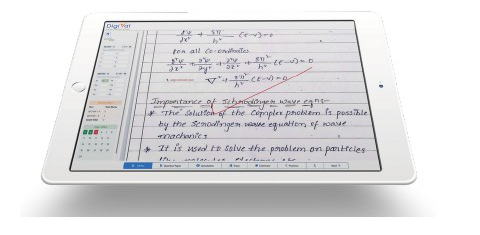
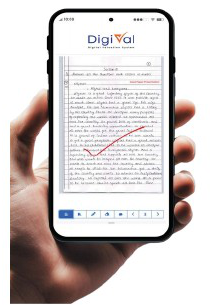
Evaluators need only a browser.Teachers need only a browser.
Laptop, desktop or tablet. Nothing to install, and new users are productive after one short session.
Scanning & deployment
We set up the exam cell, not just the software.Start with the copier you already own.
Volume decides the equipment. We size the scanning set-up to your semester load and train your operators.Most schools start with an office copier that has a document feeder. For larger volumes we recommend a dedicated scanner.
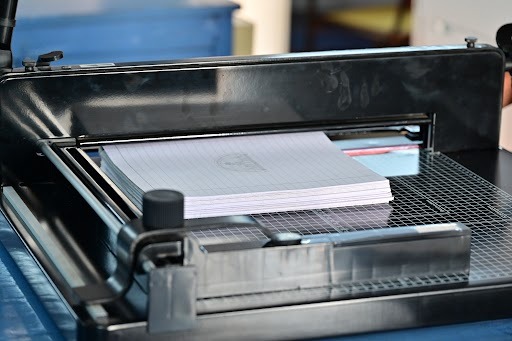
Paper cutter
Trims bound booklets so pages feed cleanly through the scanner.Only needed for stitched booklets. Loose sheets go straight in.
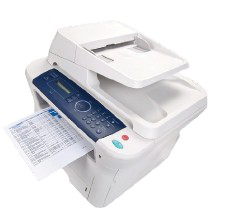
ADF scannerCopier or ADF scanner
High-speed duplex scanning of multi-page scripts, in batches.A class set takes a few minutes. We set up the scan profile with your staff.
Barcode labels
Links each booklet to its student, so identity is masked from the first scan.Links each sheet to its student, so names never reach the marker.
Get startedFree pilot
Start with one exam. Scale with confidence.One subject. Two weeks. Free.
We map your examination process, configure DigiVal to your rules and run a pilot on a real exam, so your Controller of Examinations sees the results before you commit. Pick one subject from your next pre-board or term exam. Your staff scan, your teachers mark on screen, and you get the results with a full report. If it doesn’t save your teachers time, you have lost nothing.
- Week 1DiscoverySubjects, script volume, marking schemes and timelines.
- Week 2Configure & trainExam set-up, roles, scanning and evaluator training.
- Exam cyclePilotReal scripts valued on screen, with turnaround and accuracy tracked.
- AfterScaleReview the results together and roll out across campuses.
Talk to Criativo
Request a 30-minute discovery call and live demonstration. We will map your examination process and recommend the right pilot for your university or college. Tell us about your school and your next exam. We will set up your free pilot subject and walk your teachers through it.
- Emailinfo@criativo.ai
- Webhttps://digival.criativo.ai
- OfficesKakinada, India · Dubai, UAE
We reply within one working day.
Questions exam cells ask first.Questions schools ask first.
Does DigiVal change our examination rules?
No. Your marking schemes, choice rules, moderation and revaluation policy stay exactly as they are. DigiVal digitizes the process around them, and academic judgment stays with your authorized evaluators.
Can it handle university volumes?
Yes. The live console is valuing over 8 lakh answer scripts across 86 active exams and multiple campuses. Scanning runs in batches, and allotment can be done in bulk from Excel.
Can external evaluators value remotely?
Yes. Autonomous colleges and universities can appoint external evaluators from any institution. They value from their own college or home, so you save the DA, TA and accommodation you would otherwise pay for a valuation camp.
How do we know the right person is valuing?
DigiVal captures the evaluator’s photograph during valuation and logs the IP address, start and end time, and time spent on every script. The Controller of Examinations can review any session at any time.
What do evaluators need?
A laptop or desktop with a webcam, a modern browser and an internet connection. There is no software to install.
How are skipped answers and totalling errors caught?
Totals are calculated by the system from question-wise marks. A second evaluator then scrutinises each script, and any error is logged and sent back before results are published.
Will it work with our existing examination or ERP system?
Student and subject data can be imported, and results exported in the format your system expects. Integration is scoped during discovery.
Where is our data hosted?
On DigiVal’s managed servers or on your own campus infrastructure. We agree the hosting, backup and retention arrangements with you in writing.
How much work is the scanning?
A class set takes a few minutes on a standard office copier with a document feeder. We set up the scan profile with your staff during the pilot.
Where is our students’ data kept?
On servers in the UAE. We sign a data processing agreement with your school and delete data on request.
What do teachers need?
Any laptop or tablet with a browser. There is no software to install.
Does this replace CBSE board marking?
No. CBSE marks Class 10 and 12 board papers itself. DigiVal is for your school’s own exams: periodic tests, term exams and pre-boards.
Is DigiVal already in use?
Yes. Colleges and universities in India use DigiVal for semester examinations, with over 8 lakh answer scripts valued on screen.